How to Manage Multiple Shopify Stores from One Dashboard
Learn the operational challenges of running multiple Shopify stores and the tools that help avoid juggling dozens of browser tabs.
Key points — AI summary
- Shopify puts no limit on how many stores you own, but switching between them is manual — Shopify Plus bundles 10 stores (1 main + 9 expansion) into one contract, while standard plans still require logging out and back in for each store
- Shopify Organizations centralizes staff roles, billing, and (on Plus) a global analytics dashboard, but it still lacks a unified orders dashboard, cross-store inventory sync, automated shipment tracking, and consolidated finance
- SAML-based SSO across stores is only available on Shopify Plus — standard-plan teams must log out and log back in to switch stores
- As a rule of thumb: 2–3 stores can run on Organizations alone, 4–10 stores benefit from a consolidated platform, and 10+ stores make a dedicated multi-store tool essential
- Before evaluating any platform, audit how often you manually switch between store admins and map which staff need access to which stores and features — setting up Shopify Organizations is free and a prerequisite either way
Summarized from this article by our writing pipeline; reviewed by the author.
On this page
Running multiple Shopify stores unlocks growth—expansion to new markets, separate brands, wholesale channels, regional operations. But it also introduces a hidden cost: operational fragmentation. Without the right tools, managing 5, 10, or 50 stores means logging into each one separately, switching between tabs, and manually syncing orders, inventory, and reporting. For growing e-commerce teams, this becomes unsustainable.
Shopify acknowledges this pain. Inventory synchronization, staff permissions across stores, and unified reporting are now core features in Shopify's ecosystem. But Shopify's built-in tools address only part of the problem. This guide walks through the operational reality of multi-store management, what Shopify provides natively, and how purpose-built platforms extend that capability.
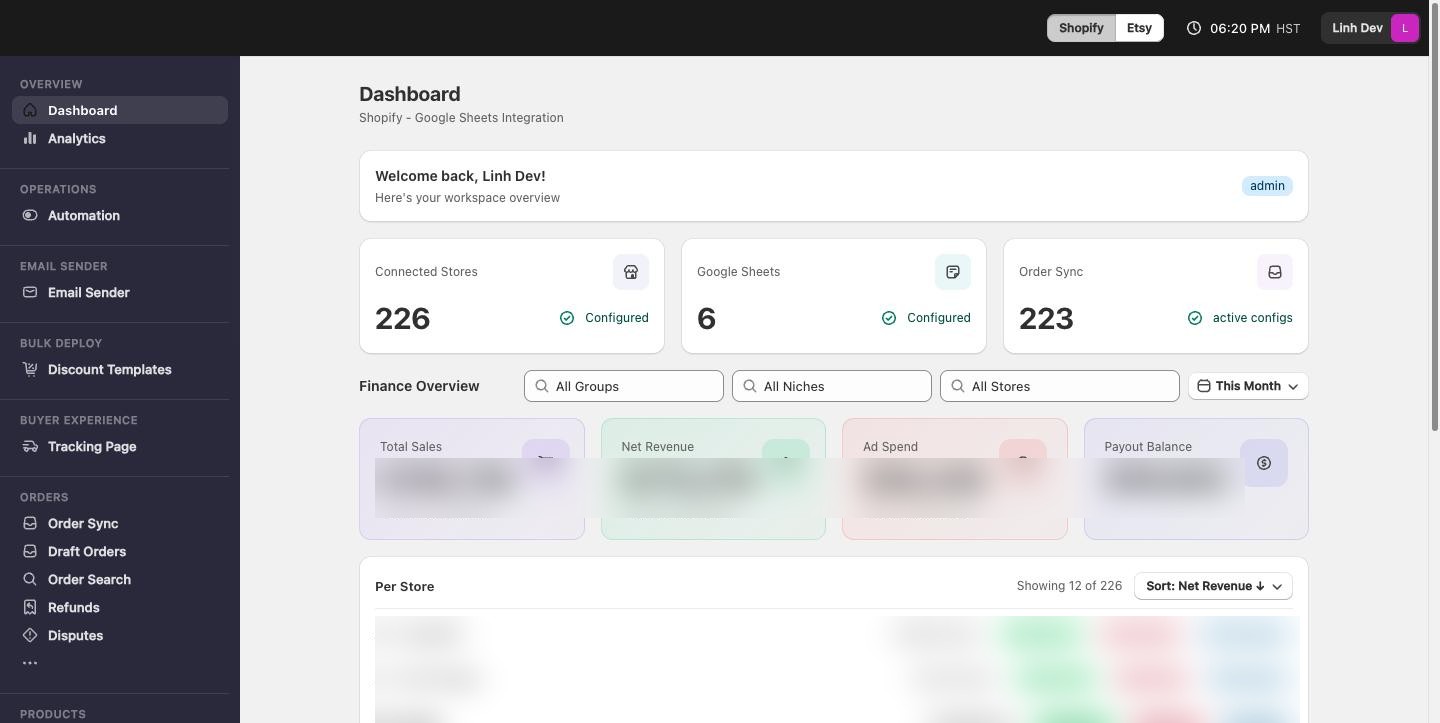
The Operational Cost of Fragmentation
Shopify does not limit the number of stores you can create. On a standard plan, you can own as many stores as you want—each with its own subscription fee. Shopify Plus merchants get 10 stores (1 main + 9 expansion stores) bundled into a single contract.
The catch: toggling between stores is still manual. Logging into your Shopify admin shows one store at a time. To compare orders, check inventory levels, or update a product across five stores, you must:
- Log out or open a new browser tab.
- Access the next store's admin.
- Repeat for each store.
For merchants running dozens of stores, this workflow drains time and introduces coordination errors. Across multi-store operations, inventory management and system integration are the pain points that tend to bite first as you add sales channels.
What Shopify Provides: Organizations and Admin Controls
Shopify introduced Organizations to centralize basic multi-store management. Here's what it does:
Centralized User Management
With Organizations, you assign staff roles and permissions once, then apply them across multiple stores. Shopify offers role-based access control (RBAC)—define roles like "Store Manager" or "Inventory Admin," then assign them to team members across your organization without reconfiguring permissions individually per store.
Billing Consolidation
Organizations bundle billing for multiple stores under the same account, simplifying invoicing and payment tracking.
Shared Reporting (Shopify Plus)
Shopify Plus merchants get access to a global analytics dashboard that aggregates performance data—revenue, conversion rates, traffic, and sales performance—across all expansion stores in one view.
This is a real improvement over separate logins. But Organizations does not provide:
- A unified orders dashboard (you still toggle between store order lists)
- Cross-store inventory sync (you manage inventory per store)
- Single Sign-On across stores (on standard plans, you must log out and log back in to switch stores; SAML-based SSO is available only on Shopify Plus)
- Automated shipment tracking across all stores
- Consolidated finance data (ad spend, payouts, revenue by source)
- Bulk product or email management
- Granular, per-feature staff permissions
For teams managing dozens of stores or requiring advanced operational control, these gaps become critical.
Beyond Shopify: Consolidated Operations Platforms
Several platforms extend Shopify's Organizations feature by building a true multi-store operating layer. These tools typically offer:
Unified Orders Dashboard: Track orders, revenue, and shipping status across all stores in real time—no tab switching.
Automated Shipment Tracking: Connect 17TRACK or similar services to monitor packages from 3,300+ carriers globally and trigger alerts when shipments get stuck.
Consolidated Finance: Aggregate revenue, ad spend, payouts, and chargebacks across every store in one reconciliation view, sorted by priority and deadline.
Bulk Operations: Push CSV product updates, bulk-assign tags or collections, or update themes across multiple stores without repetitive admin work.
Email and Communication Management: Consolidate Gmail or Outlook inboxes across stores, so customer support doesn't live in separate email accounts.
Advanced Permissions: Set permissions not just by role, but by store and by feature—allowing one team member to manage inventory in Store A but only view orders in Store B.
The category to look at is purpose-built platforms for multi-store Shopify operators. What they provide: a single dashboard for orders, revenue, and shipping across all stores; automatic order sync to Google Sheets for downstream reporting; bulk shipment tracking via 17TRACK with stuck-shipment alerts; and consolidated finance tracking for revenue, ad spend, and payouts. The pricing model matters as much as the features — a fixed subscription means managing 5 stores costs the same as managing 150, with no per-store fees.
Choosing Your Approach
If you run 2–3 stores: Shopify's Organizations feature, combined with native admin controls, may be sufficient. The overhead of switching between stores is manageable, and your team is small enough to coordinate manually.
If you run 4–10 stores: You'll likely benefit from a consolidated platform. Unified dashboards for orders and finance save hours per week, and bulk operations reduce errors when updating inventory or products across stores.
If you run 10+ stores: A dedicated multi-store platform becomes essential. The operational cost of manual coordination—errors, delays, duplicate work—outweighs the investment in tooling. Platforms that handle shipment tracking, consolidated finance, and granular permissions unlock scalability.
Implementation Checklist
- Audit your current workflow: Count how many times per week you manually switch between store admins, sync data manually, or handle multi-store customer issues.
- Map staff responsibilities: Identify which team members need access to which stores and which features. This shapes your permission model.
- Set up Shopify Organizations: Group your stores and assign role-based permissions. This is free and is a prerequisite for any multi-store workflow.
- Evaluate third-party platforms: If Organizations alone doesn't meet your operational needs, test platforms with a free trial or demo on your actual Shopify stores.
- Plan for scaling: Choose tools that support growth—if you start with 5 stores but plan to expand to 50, make sure your tooling won't force a painful migration later.
Go deeper
- Inventory Sync Across Multiple Shopify Stores — keeping stock levels consistent so you never oversell across storefronts.
- Multi-Store Realtime Dashboard Metrics — the KPIs worth watching live when you run several stores from one screen.
- Bulk Product Management for Shopify with CSV — pushing product updates to every store at once with CSV workflows.
- Multi-Store Order Fulfillment Workflow Guide — designing one fulfillment pipeline that serves all your stores.
- Shopify Staff Permissions Multiple Stores — granting per-store, per-feature access without handing out full admin rights.
- Managing Refunds & Returns Across Multiple Shopify Stores — centralizing refund and return handling so nothing slips through.
- Gmail Outlook Email Management Multiple Shopify — consolidating support inboxes across all your stores into one workflow.
The Bottom Line
Shopify's Organizations feature is a genuine step forward for multi-store management, but it handles only basic coordination (users, billing). Real multi-store operations—unified dashboards, bulk product management, consolidated finance, and advanced permissions—require purpose-built platforms.
If managing multiple stores is core to your business, investing in the right operational layer pays for itself within months through time savings, error reduction, and faster decision-making. The cost of fragmentation—team frustration, missed coordination, slower growth—is higher than the cost of consolidation.
FAQ
Does Shopify limit how many stores I can own?
No — on a standard plan Shopify puts no limit on the number of stores you can own, each with its own subscription fee; Shopify Plus bundles 10 stores (1 main + 9 expansion) into a single contract.
Does Shopify Organizations give me a unified orders dashboard?
No — Organizations centralizes staff roles, billing, and (on Shopify Plus) a global analytics dashboard, but it still lacks a unified orders dashboard, cross-store inventory sync, automated shipment tracking, and consolidated finance data.
Is single sign-on (SSO) available across Shopify stores?
Only on Shopify Plus. SAML-based SSO across stores is a Plus-only feature — standard-plan teams must log out and log back in to switch stores.
How many stores before I need a dedicated multi-store platform?
As a rule of thumb, 2–3 stores can run on Shopify Organizations alone, 4–10 stores benefit from a consolidated platform, and 10+ stores make a dedicated multi-store tool essential.